Introduction: Unpacking the Hype - Is the GLORIOUS Model I 2 Wireless Mouse Worth It?
Are you on the hunt for a new gaming mouse that can keep up with your fast-paced gameplay? The GLORIOUS Gaming Model I 2 Wireless Mouse has been making waves in the gaming community, promising a blend of lightweight design, customizable features, and high performance. But does it live up to the hype? In this blog post, we’re diving deep into what real users are saying about this mouse. We’ve scoured through hundreds of customer reviews to bring you an honest and detailed analysis. You’ll learn about the mouse’s strengths, weaknesses, and whether it’s the right fit for your gaming needs. Get ready to explore the world of the Model I 2 through the eyes of its users!
What Users Love: The Positives of the GLORIOUS Model I 2
Lightweight Design and Comfort
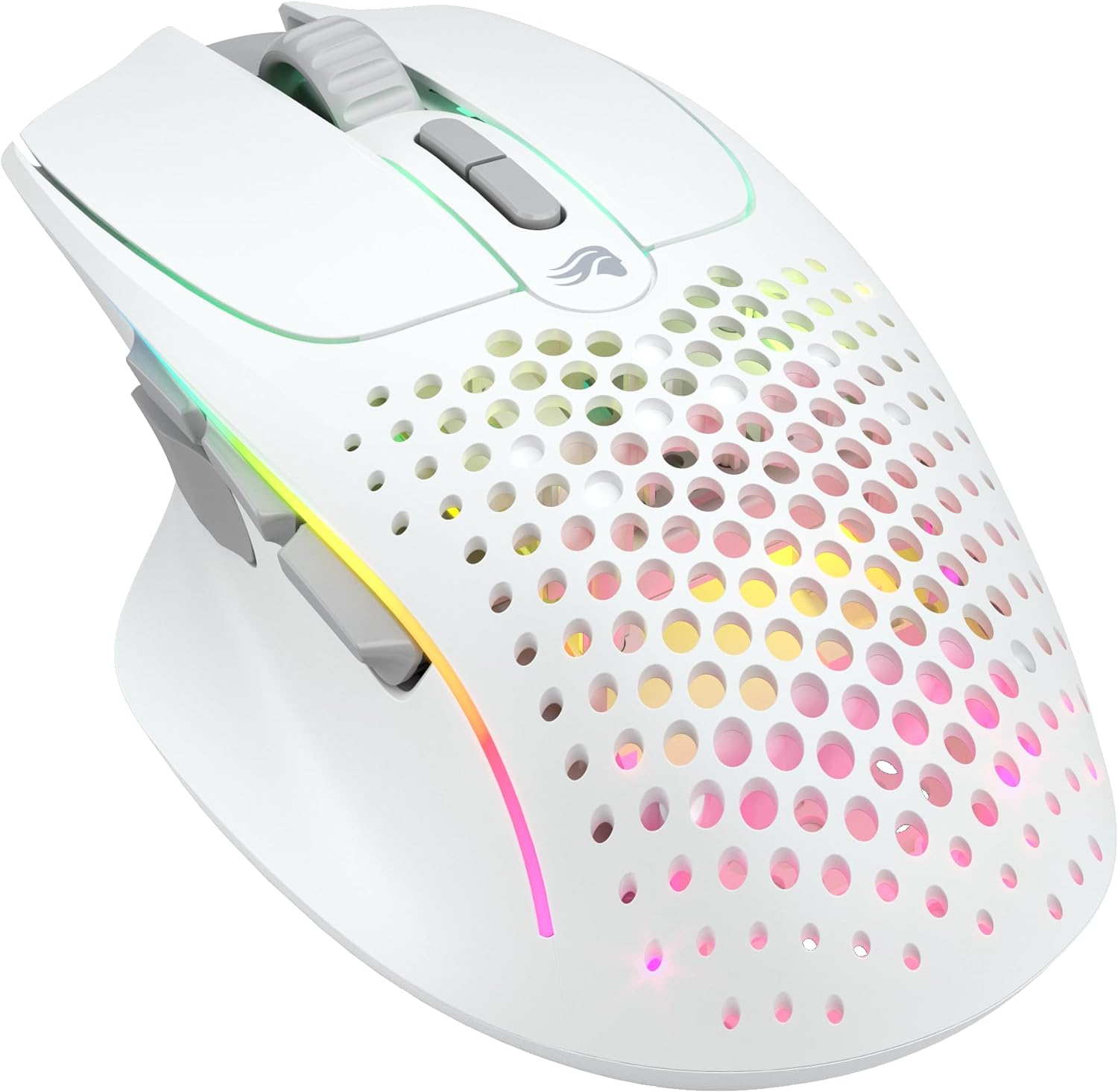
One of the most frequently praised aspects of the GLORIOUS Model I 2 Wireless Mouse is its lightweight design. Many users highlight how comfortable it is to use, especially for those with small to medium-sized hands. The ergonomic shape is designed for right-handed users, and many reviewers mention that it feels great for palm grip.
- User Feedback:
- “It’s ultra light, and every button on the mouse is within reach without having to contort my hand.”
- “For PVP the mouse feels very good and because of the 69-gram weight it is very easy to aim with and fun to PVP.”
- “This is the lightest, best looking RGB, smoothest stock skates, best feeling, mouse of all mice I have ever owned.”
The lightweight nature of the mouse is not just about comfort; it also contributes to better aim and faster reactions in games. This is a crucial factor for competitive gamers who need every advantage they can get.
Button Customization and Functionality
The Model I 2 comes with 9 programmable buttons, including two swappable side buttons. This level of customization is a big hit with users who like to tailor their mouse to their specific needs. The ability to assign commonly used actions to the mouse buttons can significantly improve reaction times and reduce strain from reaching across the keyboard.
- Key Features:
- Two programmable layers for up to 16 configurations.
- Easy switching between layers with the Action Button.
- Interchangeable side buttons for personalized comfort.
Users appreciate the flexibility this offers, whether for gaming or productivity tasks. The side buttons are often mentioned as being easily reachable, although some users have suggestions for better placement.
Smooth Motion and Responsiveness
The mouse’s smooth motion and responsiveness are frequently mentioned in reviews. The optimized BAMF 2.0 optical sensor, with up to 26,000 DPI, 650 IPS, and 1,000Hz Polling, ensures precise tracking. Motion Sync Technology is also a plus, synchronizing the mouse’s movements with the on-screen cursor for real-time tracking.
- User Comments:
- “It’s snappy, the DPI is able to be honed in to your preference, and the buttons feel good to click.”
- “The mouse itself is great, the ergonomics are much better than the ambidextrous Model O, the sensor is accurate and responsive.”
- “The mouse is good for jitter and awesome for butterfly clicking.”
The combination of a high-quality sensor and lightweight design makes the Model I 2 a great choice for gamers who need precision and speed.
Versatile Connectivity
The Model I 2 offers three connectivity options: 2.4GHz Wireless, Bluetooth 5.2 LE, and wired mode. This versatility is appreciated by users who want the flexibility to switch between different setups. The long battery life is also a plus, with up to 110 hours on 2.4GHz and 210 hours on Bluetooth (with RGB off).
- Connectivity Options:
- 2.4GHz Wireless for low-latency gaming.
- Bluetooth 5.2 LE for extended battery life.
- Wired mode for charging while playing.
This flexibility makes the mouse suitable for various use cases, from gaming at home to working on the go.
Areas for Improvement: What Users Are Concerned About
Battery Life Issues
Despite the advertised long battery life, many users have reported issues with the GLORIOUS Model I 2 Wireless Mouse battery. Some users mention that the battery drains quickly, especially when the RGB lighting is on. There are also complaints about the mouse not turning off when the PC is off, leading to unnecessary battery drain.
- User Complaints:
- “So battery life at first seemed bad, there is a setting in the crappy software that isn’t labeled well, something like, ‘disable leds after time’ or…”
- “The battery lasts two to three days whether I turn it off, leave it on.”
- “The need to charge it from my gaming PC while gaming due to the poor battery life and inability to charge from an external charger essentially made…”
These issues suggest that the battery life may not be as reliable as advertised, and users may need to adjust their usage habits to maximize battery life.
Software Quality and Reliability
The software for the Model I 2 is another area where users have mixed opinions. While some find it straightforward and easy to use, others describe it as “lacking” and “janky.” There are complaints about the software failing at basic tasks, such as determining the firmware version.
- Software Issues:
- “The software that controls the mouse is awful and janky, sometimes failing at the most basic of tasks like determining what firmware version is flashed on the…”
- “The program itself is really easy to navigate and most will have no issues with it.”
- “The software is also really good, at first it was a little confusing to understand, but I quickly got the hang of it.”
The inconsistent feedback on the software suggests that it may need further refinement to provide a more reliable and user-friendly experience.
Click Quality and Durability
While many users appreciate the light clicks of the mouse, some have reported issues with click quality and durability. Some users have experienced double clicks, cursor jumps, and difficulty registering repeated long left clicks.
- Click Issues:
- “The mouse just started double clicking, I left click once and it clicks twice, this basically makes it unusable (after like 2 months from purchase).”
- “The clicks of the mouse are pretty light but not nearly as good as the Logitech G Pro X Superlight’s clicks.”
- “There is a bit of side play on the left and right click but not enough for you to notice it when you’re playing.”
These issues raise concerns about the long-term reliability of the mouse, especially for users who engage in heavy gaming sessions.
2.4GHz Receiver Issues
Some users have reported issues with the 2.4GHz receiver, experiencing stuttering and interference. This can be a significant problem for gamers who rely on a stable wireless connection.
- Receiver Problems:
- “The 2.4GHz receiver seems to struggle with interference.”
- “I had consistent stuttering issues that weren’t massive, but very noticeable in precise games like CS2.”
- “I spent several hours troubleshooting myself and I also contacted support and exhausted their troubleshooting steps, but neither option worked.”
These issues suggest that the 2.4GHz receiver may not be as reliable as it should be, and users may need to consider using the wired or Bluetooth connection instead.
User Experiences: A Closer Look at the Reviews
The Good
Many users have had positive experiences with the GLORIOUS Model I 2 Wireless Mouse. They appreciate its lightweight design, comfortable shape, and smooth motion. The customizable buttons and versatile connectivity options are also frequently praised.
- Positive Feedback:
- “I am so happy I bought this mouse. It deals with all the problems I have had with other mice, and has a few extra buttons as a bonus.”
- “Overall, the model I is a good mouse and can be the endgame mouse for a lot of people.”
- “I enjoy the feel of this mouse. It is lightweight and has a nice matte finish.”
These users find the mouse to be a significant upgrade from their previous mice, and they appreciate its performance and features.
The Bad
On the other hand, some users have had negative experiences with the mouse. They report issues with battery life, software reliability, click quality, and the 2.4GHz receiver.
- Negative Feedback:
- “The mouse just started double clicking, I left click once and it clicks twice, this basically makes it unusable.”
- “The software that controls the mouse is awful and janky, sometimes failing at the most basic of tasks.”
- “The 2.4GHz receiver seems to struggle with interference.”
These users have encountered significant problems that have affected their overall experience with the mouse.
The Mixed
There are also users who have had mixed experiences with the Model I 2. They appreciate some aspects of the mouse, such as its lightweight design and customizable buttons, but they also encounter issues with battery life, software, or click quality.
- Mixed Feedback:
- “As for the actual performance of the mouse when it is connected and does have a charge, it does well. It’s snappy, the DPI is able to be honed in to your preference, and the buttons feel good to click. It’s ultra light, and every button on the mouse is within reach without having to contort my hand.”
- “Ultimately, if you don’t mind a dongle smack dab on the front of your PC and are willing to charge it overnight or once every couple of days, it’s a solid product. I just can’t rate it higher for those reasons.”
These users find the mouse to be a decent product, but they also acknowledge its shortcomings.
Conclusion: Is the GLORIOUS Model I 2 Wireless Mouse Right for You?
The GLORIOUS Gaming Model I 2 Wireless Mouse is a product with both strengths and weaknesses. Its lightweight design, customizable buttons, and smooth motion make it a great choice for gamers who prioritize comfort and performance. However, issues with battery life, software reliability, click quality, and the 2.4GHz receiver may be a concern for some users.
Before making a purchase, consider the following:
- Do you prioritize a lightweight and ergonomic design? If so, the Model I 2 may be a good fit.
- Are you comfortable with potentially having to adjust your usage habits to maximize battery life?
- Are you willing to troubleshoot potential software or connectivity issues?
- Do you need a reliable 2.4GHz wireless connection, or are you okay with using wired or Bluetooth?
If you’re willing to work around some of its shortcomings, the GLORIOUS Model I 2 Wireless Mouse can be a great addition to your gaming setup. However, if you need a mouse that is reliable and hassle-free, you may want to consider other options.
Don’t forget to share this post with your friends and fellow gamers! And if you’re interested in learning more about gaming peripherals, be sure to check out our other blog posts.